

Change runtime settings
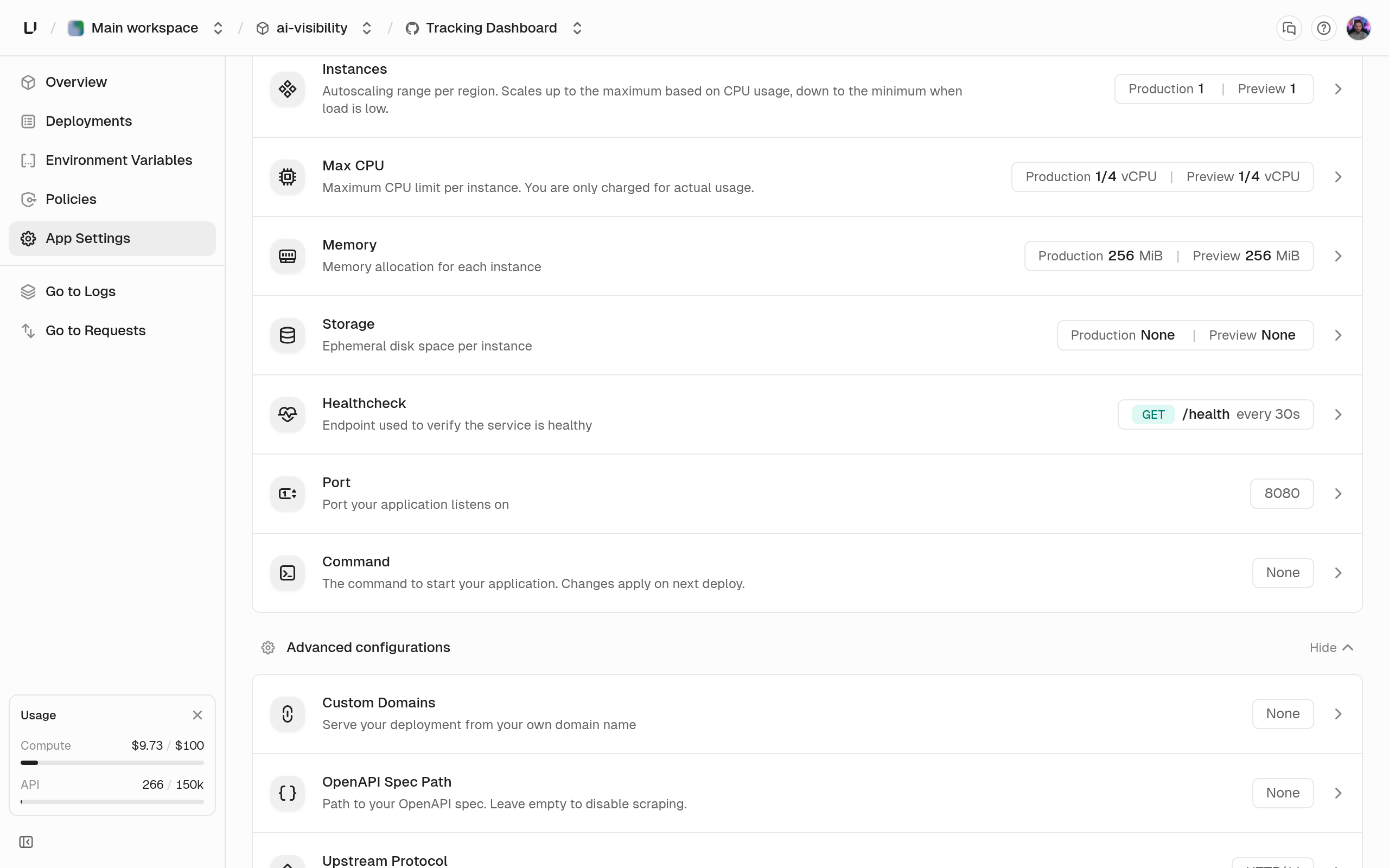
Edit them under App Settings in the dashboard, withenvironments.updateSettings in the API, or with unkey api environments update-settings in the CLI. In the API, send only the fields you want to change. environments.getEnvironment returns the current values under runtime and regions.
400 with a message like “CPU per instance cannot exceed 2 vCPU. Contact support@unkey.com to increase it.” See Compute limits.
Container
integer
default:"8080"
The port your container listens on, 1 to 65535. We set it as the
PORT environment variable, overriding any value in the image, and send traffic and health checks to it. A port outside the range fails the deployment with invalid_runtime_settings.number
default:"0.25"
CPU per instance in vCPUs, at least 0.25, in steps of 0.25, up to your plan’s limit. An instance can use up to this much and is always guaranteed at least half. The dashboard offers 1/4, 1/2, 1, 2, 4, 8, and 16 vCPU, up to what your plan allows.
integer
default:"256"
Memory per instance in MiB, at least 256, in steps of 256, up to your plan’s limit. It’s a hard limit: an instance that goes over is killed and restarted, and the dashboard shows
OOMKilled with exit code 137. The dashboard offers 256 MiB, 512 MiB, and 1, 2, 4, 8, 16, and 32 GiB, up to what your plan allows.integer
default:"0"
Temporary disk per instance in MiB, in steps of 512, up to your plan’s limit.
0 means none. When set, each instance gets its own disk at /data, and UNKEY_EPHEMERAL_DISK_PATH is set to /data. Nothing on it survives a restart or a new deployment. Without it, the container can write at most 128 MiB. The dashboard offers None, 512 MiB, and 1, 2, 5, 10, 20, and 50 GiB, up to what your plan allows.string[]
default:"[]"
Replaces the image’s command, as an array of up to 10 strings of up to 4096 characters each. An empty array runs the image’s own command. The dashboard splits a single line on spaces and ignores quotes, so use the API when an argument contains spaces.
SIGTERM | SIGINT | SIGQUIT | SIGKILL
default:"SIGTERM"
The signal your container’s main process gets when an instance is replaced or scaled in. Set it with the API or CLI. It isn’t in the dashboard.
http1 | h2c
default:"http1"
How the gateway talks to your container.
http1 is HTTP/1.1 and works with every framework. h2c is HTTP/2 without TLS. Choose it only if your server supports h2c.string | null
The path where your app serves its OpenAPI document, for example
/openapi.yaml. 1 to 512 characters, starting with / and matching ^(/[\w\-]+)+(\.[\w]+)?$. When a deployment is ready, we fetch the document with a GET and save it with that deployment. Documents up to 10 MiB are accepted, and a 404 means the deployment has no spec. The spec is used by the gateway’s OpenAPI validation policy and the dashboard’s spec diff. Send null, or leave the dashboard field empty, to turn this off.object | null
An HTTP check we run against each instance. See Health checks. Send
null to remove it.Regions and replicas
EnvironmentRegion[]
The regions the environment runs in, 1 to 5 entries, each like
{ "name": "us-east-1", "replicas": { "min": 1, "max": 3 } }. The list replaces the whole set, so regions you leave out are removed. The dashboard’s Regions and Instances cards edit this field.- The region must be available, or you get “Region ‘x’ is not available for scheduling.”
- Each region can appear once.
minis at least 1.maxis at leastminand at most your plan’s replicas-per-region limit.- Every region must use the same bounds, or you get “All regions must specify the same replica bounds; per-region autoscaling is not supported yet.”
ap-southeast-1 (Singapore), with min and max both 1, so autoscaling is off until you raise max. Pick your regions before you go live. See Regions.Raise resources and add a region
Raise resources and add a second region
Next steps
Health checks
Probe fields, defaults, and what a failing probe does.
Instances and autoscaling
What the allocation and replica bounds mean at runtime.
Compute limits
The per-instance and workspace ceilings behind the
400s.Regions
How regions are discovered, chosen, and used for failover.