keys.createKey. The only required field is the keyspace’s API ID. Everything else is optional and you can change it later with keys.updateKey. You get the key back once, in the response.
You need a root key with the permissions listed on this page. Create one in the dashboard under Settings > Root Keys, and pass it as
Authorization: Bearer <root key>. See Permission reference for every permission.api.*.create_key or api.<api_id>.create_key. Creating a recoverable key also needs api.*.encrypt_key or api.<api_id>.encrypt_key. Without it you get HTTP 404 err:unkey:data:api_not_found, not a permission error, so a missing grant looks like a missing API. See Root key permissions.
Request fields
string
required
The keyspace that owns the key, by API ID (
api_...). 3 to 255 characters matching ^[a-zA-Z0-9_]+$. You can’t move a key to another keyspace later.string
1 to 16 characters matching
^[a-zA-Z0-9_]+$. Becomes the start of the key as <prefix>_<random>, so users can tell keys apart in logs. When omitted, the key uses the keyspace’s default prefix if one is set, and otherwise has no prefix. Don’t put secrets or customer names in a prefix. It’s visible wherever the key is.string
1 to 255 characters. An internal label returned by
keys.getKey, apis.listKeys, and keys.verifyKey. Unkey never shows it to your users.integer
default:"16"
16 to 255 random bytes, base58-encoded into the key. When omitted, the key uses the keyspace’s default bytes value, or 16 if that’s unset. 16 bytes gives 2^128 possibilities, and 32 is plenty for the most sensitive uses.
string
1 to 255 characters matching
^[a-zA-Z0-9_.-]+$: your identifier for the user, organization, or tenant that owns the key. Unkey creates an identity with this externalId if none exists and links the key to it, so every verification returns identity.externalId and any metadata or shared rate limits set on the identity. See Identities.object
Arbitrary JSON returned in full on every verification. At most 100 top-level properties. Keep it small: it travels with every
keys.verifyKey response, and the whole request body is capped at 10 MiB. Don’t store secrets here. See Metadata and tags.string[]
Up to 100 role names, each 1 to 128 characters. Every role must already exist in the workspace or the request fails. Roles bundle permissions, and the key gains all of them.
string[]
Up to 1000 permission slugs, each 1 to 128 characters matching
^[a-zA-Z0-9_:\-\.\*]+$. Added to the key on top of what its roles grant. Unlike roles, a slug that doesn’t exist yet is created for you. An asterisk is a literal character, not a wildcard.integer
Unix timestamp in milliseconds, at most
4102444800000 (1 January 2100). After this instant verification returns code: EXPIRED. Omit for a key that never expires. See Key expiration.object
Usage metering.
credits.remaining (integer, 0 or more) is the number of verifications the key can still afford. credits.refill optionally restores it on a schedule with interval (daily or monthly), amount (1 or more), and refillDay (1 to 31, required for monthly). remaining must be set whenever refill is set. Omit the whole object for unlimited usage. See Credits and refill.object[]
Up to 50 named rate limits, each with
name (3 to 128 characters), limit (1 or more), duration in milliseconds (1000 or more), and autoApply (boolean, required). Limits with autoApply: true are checked on every verification. The others are checked only when a verification names them. See Key and identity rate limits.boolean
default:"true"
Set to
false to create the key in a disabled state. Verification returns code: DISABLED until you enable it. See Disabling and deleting keys.boolean
default:"false"
Store an encrypted copy of the key so
keys.getKey and apis.listKeys can show it later with decrypt: true. If the keyspace doesn’t have encrypted storage turned on, you get HTTP 412 err:unkey:application:precondition_failed. If the root key lacks the encrypt permission, you get HTTP 404 err:unkey:data:api_not_found. See Recoverable keys.Example
Response
keyId is the identifier you use for every later management call. key is the key itself, and this is the only time it’s returned. Unkey keeps only a hash, plus an encrypted copy if you asked for a recoverable key. Send it to your user over a secure channel and don’t log it.
Key format
A key looks like<prefix>_<random>, or just <random> without a prefix. The random part is byteLength random bytes in base58. keys.getKey and apis.listKeys return a start field, <prefix>_<first four characters>, so you can recognize a key without seeing all of it.
From the dashboard
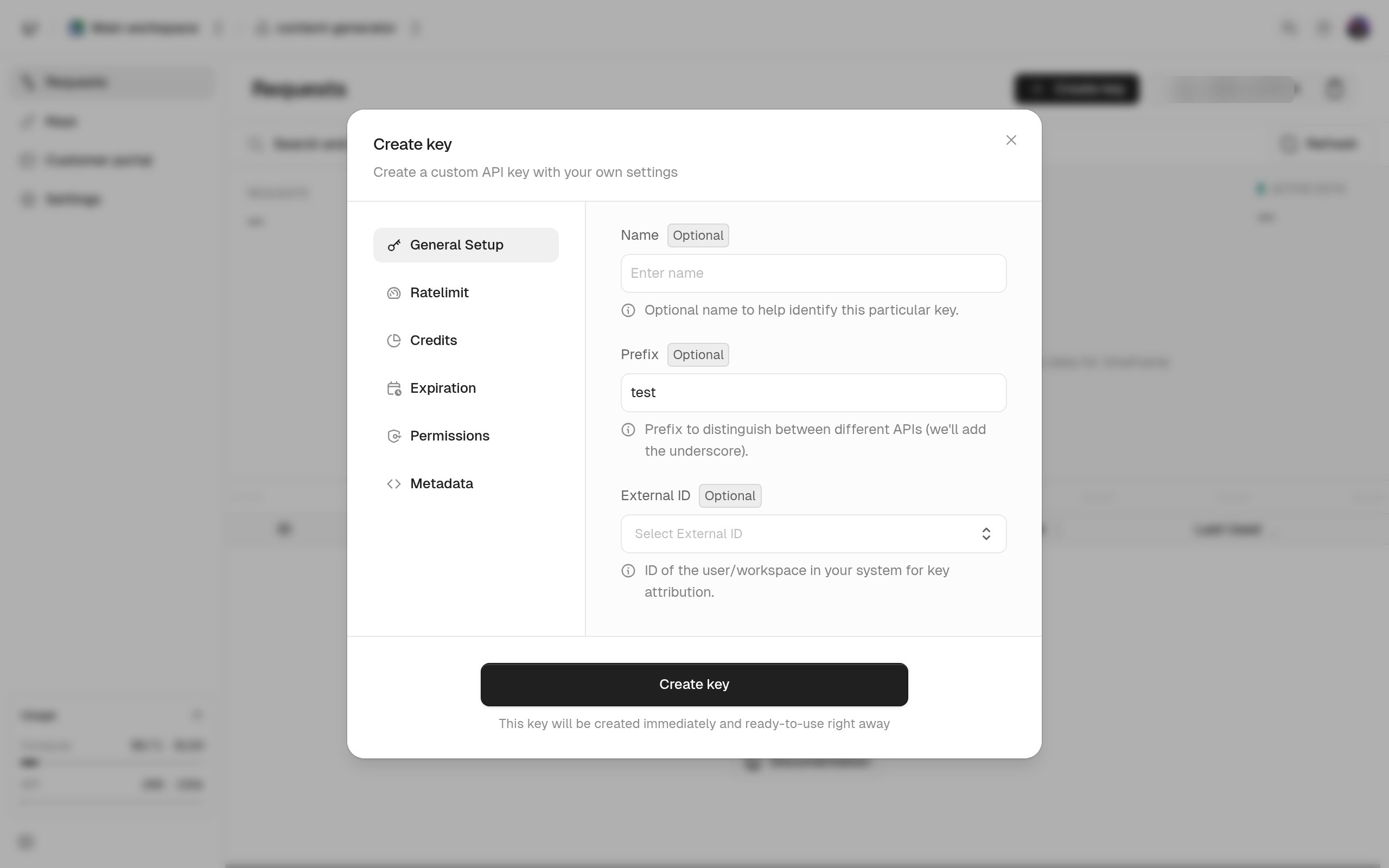
The keyspace’s Create key dialog has the same fields in six steps: general setup, rate limits, credits, expiration, permissions, and metadata. Two things differ from the API. Expiry must be at least two minutes in the future, and the general step has an field, a free-text label of up to 256 characters. The API can’t set it and verification doesn’t return it, so usemeta if your backend needs the label.