> ## Documentation Index
> Fetch the complete documentation index at: https://unkey.com/docs/llms.txt
> Use this file to discover all available pages before exploring further.
# Compute billing
> How Unkey bills Compute: a monthly plan fee that includes the same amount of usage credit, metered rates for CPU, memory, disk, egress, and active keys, and how the invoice comes together.
Compute bills a monthly plan fee plus usage. The fee includes usage credit worth the same amount, so the fee already covers your first slice of usage. You pay extra only for usage past the credit.
## Plans
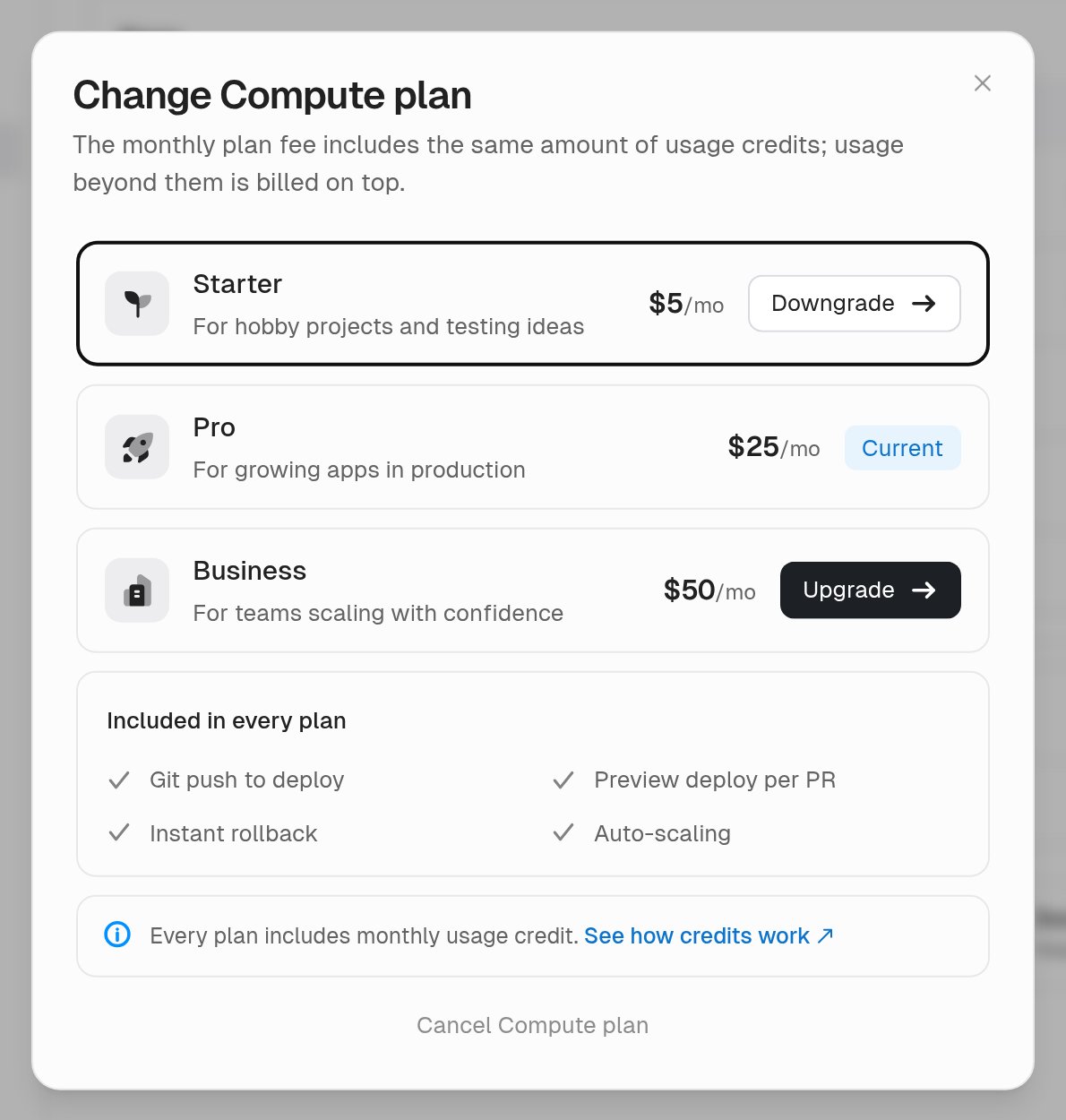
You need a Compute plan to create projects and deploy. All plans use the same usage rates. A higher plan costs more, includes more credit, and raises the limits on your instances.
| Plan | Monthly fee | Included usage credit | Max per instance | Custom domains |
| -------- | ----------- | --------------------- | ---------------------- | -------------- |
| Starter | \$5 | \$5 | 2 vCPU, 2 GiB memory | 1 |
| Pro | \$25 | \$25 | 8 vCPU, 8 GiB memory | Unlimited |
| Business | \$50 | \$50 | 16 vCPU, 32 GiB memory | Unlimited |
See [Limits](/docs/platform/workspaces/quotas) for the full list and [unkey.com/pricing](https://unkey.com/pricing) for current prices.
 ## How the bill works
Each month you pay the plan fee up front. Unkey grants the same dollar amount as usage credit for that month. Usage is metered as your workloads run, and at the end of the month the credit is subtracted. Whatever remains is the overage.
Some examples on the Pro plan:
| Usage this month | Fee already paid | Credit applied | Overage | Total for the month |
| ---------------- | ---------------- | -------------- | ------- | ------------------- |
| \$10 | \$25 | \$10 | \$0 | \$25 |
| \$25 | \$25 | \$25 | \$0 | \$25 |
| \$40 | \$25 | \$25 | \$15 | \$40 |
| \$100 | \$25 | \$25 | \$75 | \$100 |
Stay within the credit and the fee is all you pay. Credit that you don't use expires with the month. It doesn't roll over. Using $10 in June doesn't give you $40 in July.
## Usage rates
Usage is measured per workspace and priced at these rates. **Settings > Usage** shows each meter's quantity and cost for the current month.
| Meter | Rate | What it measures |
| ----------- | ---------------------- | ------------------------------------------------------------------------------------------ |
| CPU | \$0.025 per vCPU-hour | vCPU time your workloads ran, totalled across the month |
| Memory | \$0.0125 per GiB-hour | Memory allocated over time. 1 GiB held for 1 hour is 1 GiB-hour |
| Disk | \$0.00022 per GiB-hour | Disk reserved over time. Charged on the size reserved, not on reads, writes, or space used |
| Egress | \$0.05 per GiB | Data your workloads sent out over the public network |
| Active keys | \$0.002 per key | Distinct API keys verified through the Compute gateway during the month |
A running instance consumes CPU, memory, and disk whether or not it receives traffic. Only stopped or removed deployments stop those meters.
## Billing period and invoice timing
The Compute billing period is the calendar month, in UTC. Every Compute subscription renews on the first of the month.
The invoice that Stripe issues on the first of a month contains two things:
* The plan fee for the month that starts, billed in advance
* Any overage from the month that just ended, billed in arrears
* Proration lines if you changed plans during the month
For example, the invoice on July 1 charges the July plan fee plus any June usage above the June credit. On the invoice, the credit appears as a discount line named after the plan, such as "Pro plan monthly included usage".
When you subscribe partway through a month, the first fee is prorated to the days left in the month, and the credit for that month is prorated by the same amount.
## Change plan
Upgrades apply at once and buy more credit for the rest of the month. Downgrades keep the current month as you paid for it.
1. Navigate to **Settings > Billing**.
2. On the **Compute** row, click **Choose a plan** or **Change**.
3. Select a plan and confirm.
| Change | When it applies | What you pay |
| --------- | --------------- | -------------------------------------------------------------------------------------------------------- |
| Upgrade | Immediately | The prorated fee difference for the rest of the month, charged now. Unkey adds the same amount as credit |
| Downgrade | Next month | Nothing now. You keep this month's credit. The lower fee and its smaller credit start on the first |
## Cancel Compute
Cancelling Compute stops every deployment in the workspace right away and removes the plan.
1. Navigate to **Settings > Billing**.
2. On the **Compute** row, click **Change**, then **Cancel Compute plan** and confirm.
The fee you paid for the current month is not refunded. Usage up to the moment you cancelled still appears on the final invoice. Compute [limits](/docs/platform/workspaces/quotas) drop back to Free plan defaults. If you also have an API plan, it is not affected.
If you want to keep your deployments running but pay less, downgrade instead of cancelling. A downgrade costs nothing this month and the lower fee starts on the first of next month.
## Keep usage in check
Most unexpected Compute charges come from workloads that run without anyone noticing.
* Production instances bill around the clock. A deployment that receives no traffic still holds CPU, memory, and disk. Remove deployments you don't need.
* Preview deployments bill while active. They run real instances and stop only after an hour with no requests. See [Deployments per environment](/docs/environments/overview#deployments-per-environment).
* Large responses add egress. Serving big payloads or files from a workload counts against the egress meter.
To put a hard ceiling on spend, set a [spend budget](/docs/platform/workspaces/billing/spend-budget).
## How the bill works
Each month you pay the plan fee up front. Unkey grants the same dollar amount as usage credit for that month. Usage is metered as your workloads run, and at the end of the month the credit is subtracted. Whatever remains is the overage.
Some examples on the Pro plan:
| Usage this month | Fee already paid | Credit applied | Overage | Total for the month |
| ---------------- | ---------------- | -------------- | ------- | ------------------- |
| \$10 | \$25 | \$10 | \$0 | \$25 |
| \$25 | \$25 | \$25 | \$0 | \$25 |
| \$40 | \$25 | \$25 | \$15 | \$40 |
| \$100 | \$25 | \$25 | \$75 | \$100 |
Stay within the credit and the fee is all you pay. Credit that you don't use expires with the month. It doesn't roll over. Using $10 in June doesn't give you $40 in July.
## Usage rates
Usage is measured per workspace and priced at these rates. **Settings > Usage** shows each meter's quantity and cost for the current month.
| Meter | Rate | What it measures |
| ----------- | ---------------------- | ------------------------------------------------------------------------------------------ |
| CPU | \$0.025 per vCPU-hour | vCPU time your workloads ran, totalled across the month |
| Memory | \$0.0125 per GiB-hour | Memory allocated over time. 1 GiB held for 1 hour is 1 GiB-hour |
| Disk | \$0.00022 per GiB-hour | Disk reserved over time. Charged on the size reserved, not on reads, writes, or space used |
| Egress | \$0.05 per GiB | Data your workloads sent out over the public network |
| Active keys | \$0.002 per key | Distinct API keys verified through the Compute gateway during the month |
A running instance consumes CPU, memory, and disk whether or not it receives traffic. Only stopped or removed deployments stop those meters.
## Billing period and invoice timing
The Compute billing period is the calendar month, in UTC. Every Compute subscription renews on the first of the month.
The invoice that Stripe issues on the first of a month contains two things:
* The plan fee for the month that starts, billed in advance
* Any overage from the month that just ended, billed in arrears
* Proration lines if you changed plans during the month
For example, the invoice on July 1 charges the July plan fee plus any June usage above the June credit. On the invoice, the credit appears as a discount line named after the plan, such as "Pro plan monthly included usage".
When you subscribe partway through a month, the first fee is prorated to the days left in the month, and the credit for that month is prorated by the same amount.
## Change plan
Upgrades apply at once and buy more credit for the rest of the month. Downgrades keep the current month as you paid for it.
1. Navigate to **Settings > Billing**.
2. On the **Compute** row, click **Choose a plan** or **Change**.
3. Select a plan and confirm.
| Change | When it applies | What you pay |
| --------- | --------------- | -------------------------------------------------------------------------------------------------------- |
| Upgrade | Immediately | The prorated fee difference for the rest of the month, charged now. Unkey adds the same amount as credit |
| Downgrade | Next month | Nothing now. You keep this month's credit. The lower fee and its smaller credit start on the first |
## Cancel Compute
Cancelling Compute stops every deployment in the workspace right away and removes the plan.
1. Navigate to **Settings > Billing**.
2. On the **Compute** row, click **Change**, then **Cancel Compute plan** and confirm.
The fee you paid for the current month is not refunded. Usage up to the moment you cancelled still appears on the final invoice. Compute [limits](/docs/platform/workspaces/quotas) drop back to Free plan defaults. If you also have an API plan, it is not affected.
If you want to keep your deployments running but pay less, downgrade instead of cancelling. A downgrade costs nothing this month and the lower fee starts on the first of next month.
## Keep usage in check
Most unexpected Compute charges come from workloads that run without anyone noticing.
* Production instances bill around the clock. A deployment that receives no traffic still holds CPU, memory, and disk. Remove deployments you don't need.
* Preview deployments bill while active. They run real instances and stop only after an hour with no requests. See [Deployments per environment](/docs/environments/overview#deployments-per-environment).
* Large responses add egress. Serving big payloads or files from a workload counts against the egress meter.
To put a hard ceiling on spend, set a [spend budget](/docs/platform/workspaces/billing/spend-budget).