> ## Documentation Index
> Fetch the complete documentation index at: https://unkey.com/docs/llms.txt
> Use this file to discover all available pages before exploring further.
> ## Agent Instructions
> Unkey is two separate products. Compute builds, deploys, and runs apps behind a gateway. API Management issues API keys, enforces rate limits, manages identities and permissions, and reports usage. Say which product a page belongs to; a reader can use either without the other.
> Every Unkey API endpoint is an HTTP POST to https://api.unkey.com/v2/{service}.{procedure} with a root key in the Authorization: Bearer header. Root keys are workspace scoped.
> Error codes have the form err:{system}:{category}:{specific} and each has a page at /errors/{system}/{category}/{specific}.
> The word environment means production or preview in Compute. Rate limiting has four meanings on this site; the glossary lists them.
# Delete protection
> Stop a keyspace, project, or app from being deleted by accident.
Delete protection stops a keyspace, project, or app from being deleted by accident. While it's on, nobody can delete that resource from the dashboard or the API. To delete it, you first turn protection off, which is logged in the audit log, and then delete it.
## What you can protect
Protection is off until you turn it on. The one exception is the **Default** project we create for your workspace, which starts protected.
| Resource | Product | Where to turn it on |
| - | - | - |
| Keyspace (API) | API Management | Dashboard: the keyspace's **Settings** page. |
| Project | Compute | API or CLI: `deleteProtection` on `projects.updateProject`. |
| App | Compute | API or CLI: `deleteProtection` on `apps.updateApp`. |
## Protect a keyspace
In the dashboard, open the keyspace and go to its **Settings** page. The **Delete Protection** card shows **Enabled** or **Disabled**.
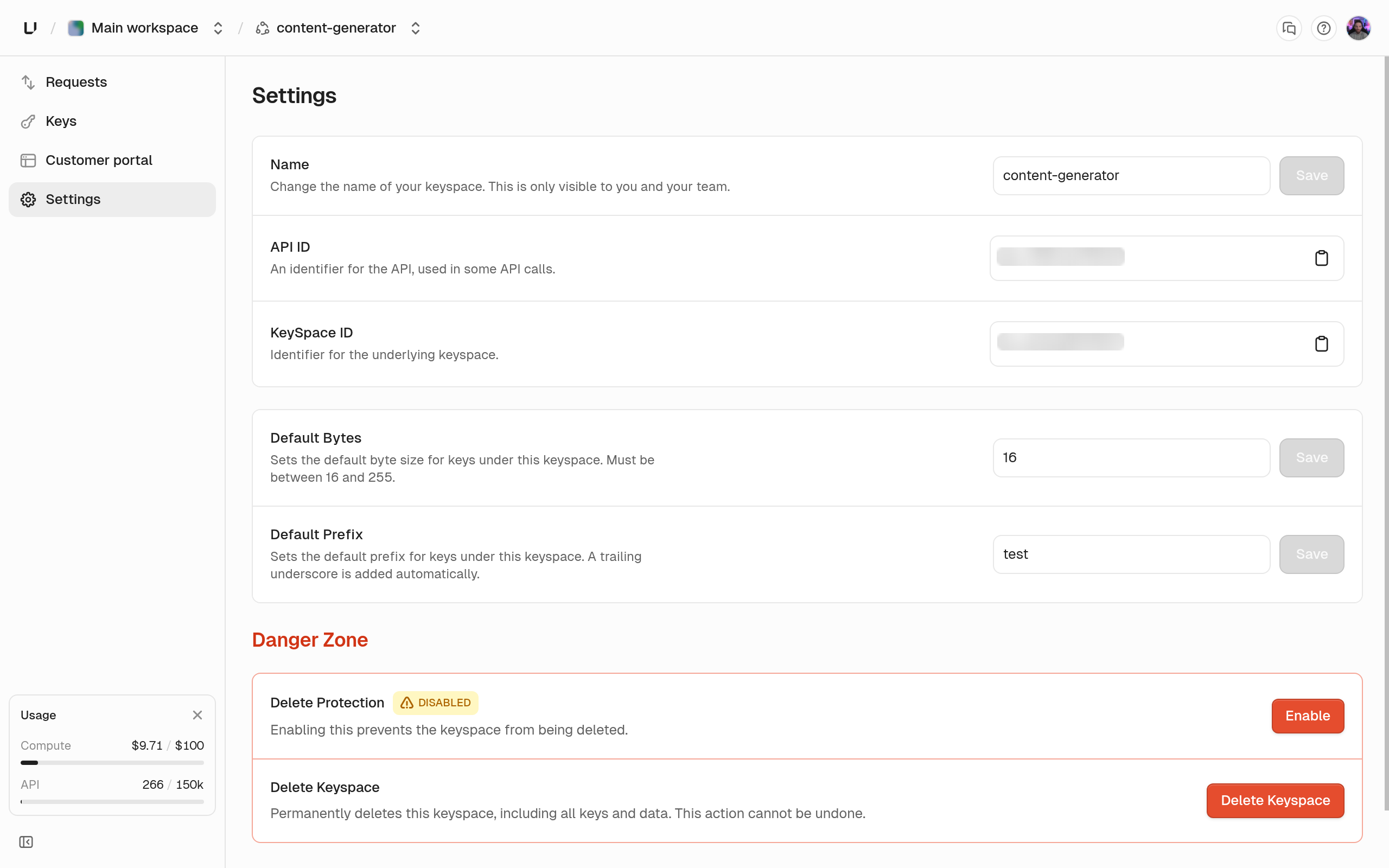 Click **Enable** (or **Disable**), type the keyspace name to confirm, and submit. The audit log records the change as `api.update`.
## Protect an app or project
Use the CLI or the API with a root key that has `update_app` or `update_project`.
```bash CLI theme={"system"}
unkey api apps update-app --project=payments --app=payments-api --delete-protection
```
```bash API theme={"system"}
curl -X POST https://api.unkey.com/v2/apps.updateApp \
-H "Authorization: Bearer " \
-H "Content-Type: application/json" \
-d '{"project": "payments", "app": "payments-api", "deleteProtection": true}'
```
For a project, use `unkey api projects update-project --delete-protection` or `projects.updateProject`. To turn it off, pass `--delete-protection=false` or `"deleteProtection": false`. If you leave the field out, the current value stays, so an update that only renames the resource doesn't clear protection. `apps.getApp`, `projects.getProject`, and the list endpoints return the current flag.
Toggle from a script with a root key that is allowed to update the app. `project` and `app` accept either the prefixed ID or the slug.
```bash theme={"system"}
curl -X POST https://api.unkey.com/v2/apps.updateApp \
-H "Authorization: Bearer " \
-H "Content-Type: application/json" \
-d '{"project": "proj_...", "app": "app_...", "deleteProtection": true}'
```
## When you try to delete a protected resource
In the dashboard, the **Delete** action on a protected keyspace refuses with "This API has delete protection enabled. Please disable it before deleting the API."
In the API, `apis.deleteApi`, `apps.deleteApp`, and `projects.deleteProject` return HTTP 412 with the code `err:unkey:application:protected_resource`. The detail names the resource type: "This API has delete protection enabled", "This app has delete protection enabled", or "This project has delete protection enabled".
```json theme={"system"}
{
"meta": { "requestId": "req_..." },
"error": {
"title": "Resource is protected",
"type": "/errors/unkey/application/protected_resource",
"detail": "This API has delete protection enabled. Disable it before attempting to delete.",
"status": 412
}
}
```
To fix it, turn protection off on that resource, then delete it again. See the [error page](/docs/errors/unkey/application/protected_resource).
Click **Enable** (or **Disable**), type the keyspace name to confirm, and submit. The audit log records the change as `api.update`.
## Protect an app or project
Use the CLI or the API with a root key that has `update_app` or `update_project`.
```bash CLI theme={"system"}
unkey api apps update-app --project=payments --app=payments-api --delete-protection
```
```bash API theme={"system"}
curl -X POST https://api.unkey.com/v2/apps.updateApp \
-H "Authorization: Bearer " \
-H "Content-Type: application/json" \
-d '{"project": "payments", "app": "payments-api", "deleteProtection": true}'
```
For a project, use `unkey api projects update-project --delete-protection` or `projects.updateProject`. To turn it off, pass `--delete-protection=false` or `"deleteProtection": false`. If you leave the field out, the current value stays, so an update that only renames the resource doesn't clear protection. `apps.getApp`, `projects.getProject`, and the list endpoints return the current flag.
Toggle from a script with a root key that is allowed to update the app. `project` and `app` accept either the prefixed ID or the slug.
```bash theme={"system"}
curl -X POST https://api.unkey.com/v2/apps.updateApp \
-H "Authorization: Bearer " \
-H "Content-Type: application/json" \
-d '{"project": "proj_...", "app": "app_...", "deleteProtection": true}'
```
## When you try to delete a protected resource
In the dashboard, the **Delete** action on a protected keyspace refuses with "This API has delete protection enabled. Please disable it before deleting the API."
In the API, `apis.deleteApi`, `apps.deleteApp`, and `projects.deleteProject` return HTTP 412 with the code `err:unkey:application:protected_resource`. The detail names the resource type: "This API has delete protection enabled", "This app has delete protection enabled", or "This project has delete protection enabled".
```json theme={"system"}
{
"meta": { "requestId": "req_..." },
"error": {
"title": "Resource is protected",
"type": "/errors/unkey/application/protected_resource",
"detail": "This API has delete protection enabled. Disable it before attempting to delete.",
"status": 412
}
}
```
To fix it, turn protection off on that resource, then delete it again. See the [error page](/docs/errors/unkey/application/protected_resource).