> ## Documentation Index
> Fetch the complete documentation index at: https://unkey.com/docs/llms.txt
> Use this file to discover all available pages before exploring further.
> ## Agent Instructions
> Unkey is two separate products. Compute builds, deploys, and runs apps behind a gateway. API Management issues API keys, enforces rate limits, manages identities and permissions, and reports usage. Say which product a page belongs to; a reader can use either without the other.
> Every Unkey API endpoint is an HTTP POST to https://api.unkey.com/v2/{service}.{procedure} with a root key in the Authorization: Bearer header. Root keys are workspace scoped.
> Error codes have the form err:{system}:{category}:{specific} and each has a page at /errors/{system}/{category}/{specific}.
> The word environment means production or preview in Compute. Rate limiting has four meanings on this site; the glossary lists them.
# Usage
> Check what your workspace has used this month before the invoice arrives.
Usage covers one calendar month (UTC), with one total per product: API for every workspace, Compute once you have a Compute plan.
## API management
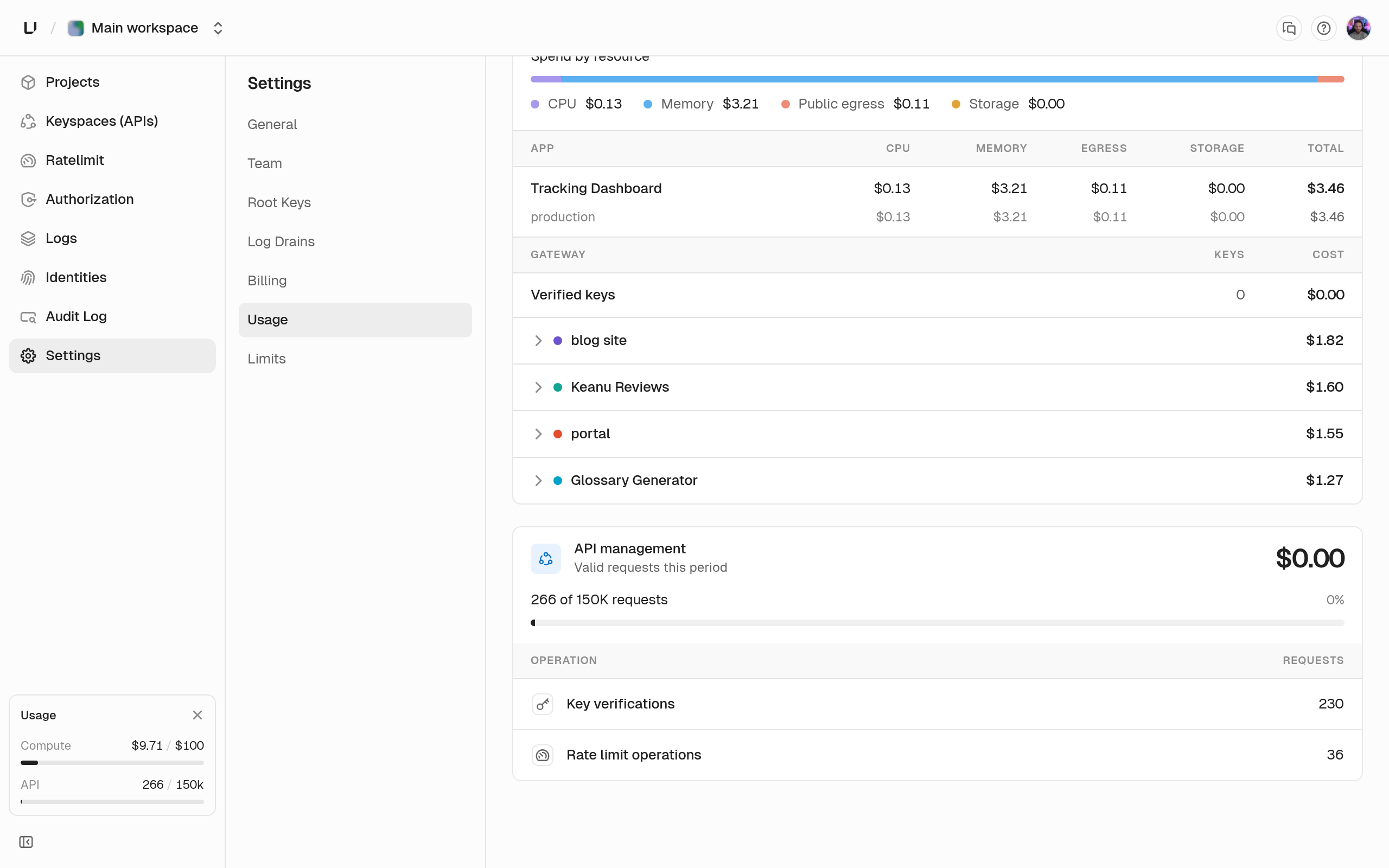
Usage has two parts, **Key verifications** and **standalone rate limit operations**, metered against your monthly operations quota. Only successful calls count: invalid, expired, or over-limit requests aren't billed. These two are the billable operations that [Limits](/docs/platform/billing/limits) caps and that a paid API tier prices.
 ## Compute
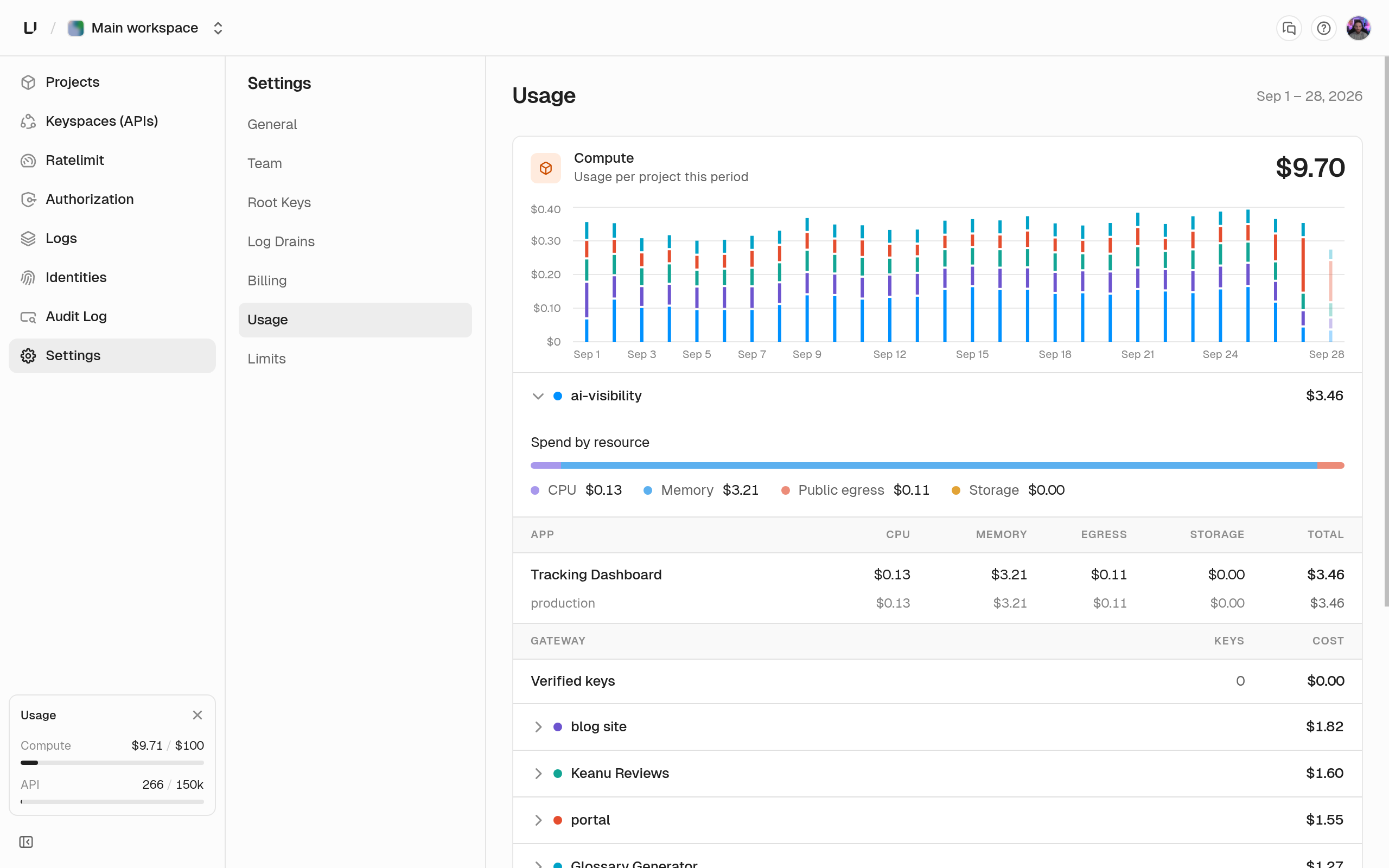
Compute usage totals cost for the period, broken down by project, then app, then environment. Each level shows four quantities and a cost.
## Compute
Compute usage totals cost for the period, broken down by project, then app, then environment. Each level shows four quantities and a cost.
 | Quantity | Meaning |
| - | - |
| CPU (vCPU-hrs) | vCPU allocated to running instances, integrated over time. |
| Memory (GiB-hrs) | Memory allocated to running instances, integrated over time. |
| Egress (GiB) | Bytes sent out of the platform. |
| Storage (GiB-hrs) | Ephemeral disk allocated, integrated over time. |
If a project uses gateway key auth, it also carries **Verified keys**: those verifications bill to the project, not a keyspace.
Usage is what you consumed. [Limits](/docs/platform/billing/limits) are the ceilings. Costs here are the metered part of the bill. The plan fee and included credit are on [Plans](/docs/platform/billing/plans).
| Quantity | Meaning |
| - | - |
| CPU (vCPU-hrs) | vCPU allocated to running instances, integrated over time. |
| Memory (GiB-hrs) | Memory allocated to running instances, integrated over time. |
| Egress (GiB) | Bytes sent out of the platform. |
| Storage (GiB-hrs) | Ephemeral disk allocated, integrated over time. |
If a project uses gateway key auth, it also carries **Verified keys**: those verifications bill to the project, not a keyspace.
Usage is what you consumed. [Limits](/docs/platform/billing/limits) are the ceilings. Costs here are the metered part of the bill. The plan fee and included credit are on [Plans](/docs/platform/billing/plans).