> ## Documentation Index
> Fetch the complete documentation index at: https://unkey.com/docs/llms.txt
> Use this file to discover all available pages before exploring further.
> ## Agent Instructions
> Unkey is two separate products. Compute builds, deploys, and runs apps behind a gateway. API Management issues API keys, enforces rate limits, manages identities and permissions, and reports usage. Say which product a page belongs to; a reader can use either without the other.
> Every Unkey API endpoint is an HTTP POST to https://api.unkey.com/v2/{service}.{procedure} with a root key in the Authorization: Bearer header. Root keys are workspace scoped.
> Error codes have the form err:{system}:{category}:{specific} and each has a page at /errors/{system}/{category}/{specific}.
> The word environment means production or preview in Compute. Rate limiting has four meanings on this site; the glossary lists them.
# Health checks
> Tell Unkey how to probe your app and what happens when the probe fails.
A health check tells us how to tell whether your app is ready and still working. We send an HTTP request to each instance on a schedule. It's optional, and you set it per environment.
## What the health check does
* **An instance gets no traffic until it passes.** So a deployment can wait for your app to finish starting before the first request arrives.
* **An instance that fails `failureThreshold` checks in a row is restarted.**
A `GET` check passes on any status from 200 to 399. Anything else, including a timeout, is a failure.
Without a health check, an instance is ready as soon as its container is running, and it's only restarted if the process exits. That's fine for apps that are ready as soon as they open the port. Add a check if startup takes a while, or if your process can be running but unable to serve.
## Choose what to check
Check the process, not its dependencies. A failing check restarts the container, so a check that queries your database takes every instance down when the database has a bad minute. `GET /healthz` returning `200` is enough.
## Add a health check
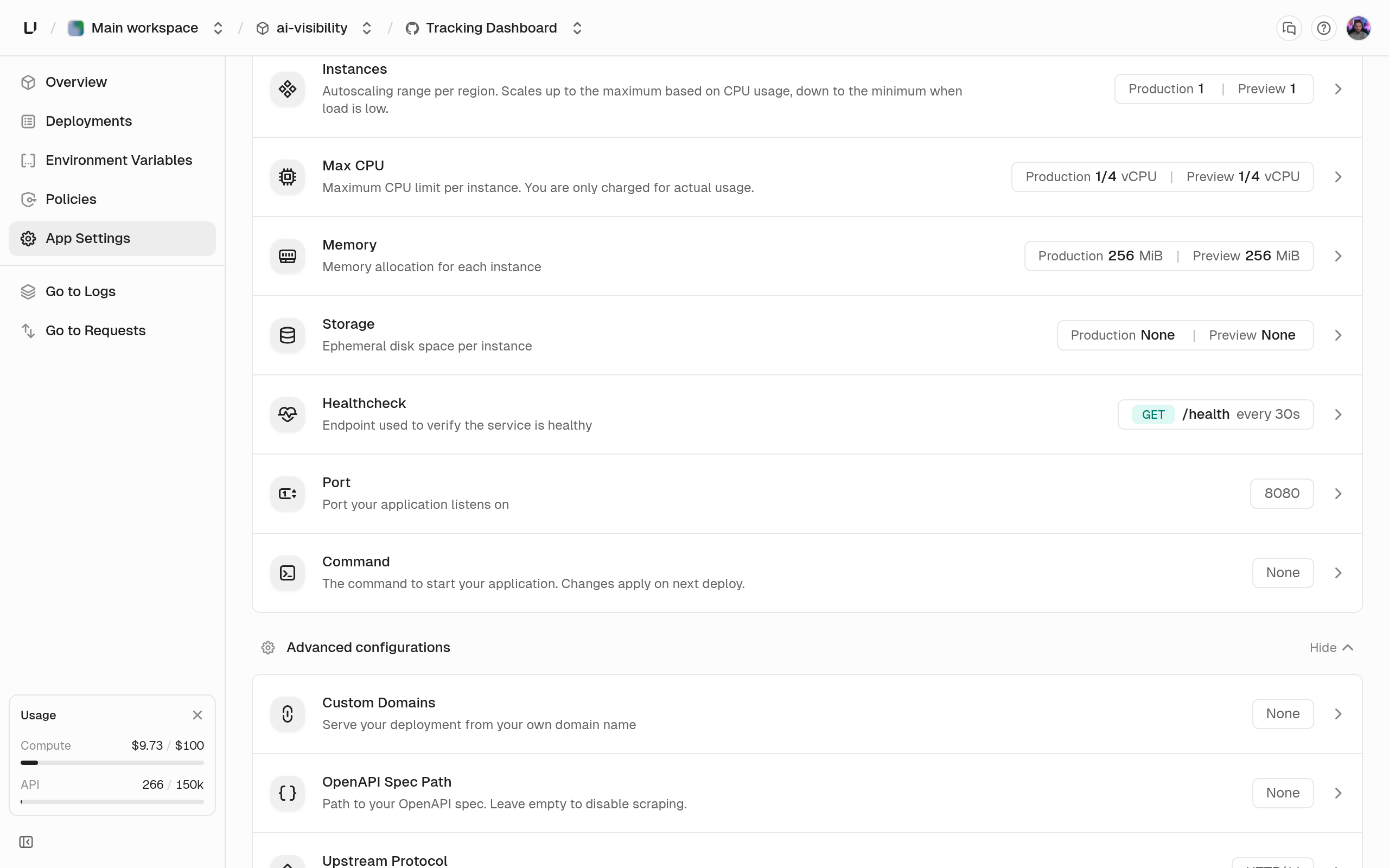 In the dashboard, open the app's settings and use the **Health check** card. In the API, set `healthcheck` in [runtime settings](/docs/compute/configure/runtime-settings) with `environments.updateSettings`:
```bash Add a check with a shorter timeout theme={"system"}
curl -X POST https://api.unkey.com/v2/environments.updateSettings \
-H "Authorization: Bearer $UNKEY_ROOT_KEY" \
-H "Content-Type: application/json" \
-d '{
"project": "payments",
"app": "api",
"environment": "production",
"healthcheck": {
"method": "GET",
"path": "/healthz",
"intervalSeconds": 10,
"timeoutSeconds": 3,
"failureThreshold": 3,
"initialDelaySeconds": 5
}
}'
```
Like every runtime setting, it applies from the next deployment. To remove the check, use the remove action on the card, or send `"healthcheck": null`.
## Fields
Only `method` and `path` are required. The others use the defaults below.
The HTTP method. `POST` sends an empty body using `wget` inside your container, so your image must include `wget`.
The path to request on your app's port, 1 to 512 characters, starting with `/` and matching `^(/[\w\-]+)+(\.[\w]+)?$`, for example `/healthz`.
Seconds between checks, 1 to 3600. The dashboard defaults to `30s` and accepts values like `15s`, `2m`, or `1h`.
Seconds to wait for a response before the check fails, 1 to 3600. Only settable in the API. Saving from the dashboard sets 5.
Failures in a row before the instance is restarted, 1 to 100. Only settable in the API. Saving from the dashboard sets 3.
Seconds after the container starts before the first check, 0 to 3600. Only settable in the API. Saving from the dashboard sets 0.
## Next steps
How readiness, restarts, and traffic distribution fit together.
How a deployment waits for healthy instances across regions.
In the dashboard, open the app's settings and use the **Health check** card. In the API, set `healthcheck` in [runtime settings](/docs/compute/configure/runtime-settings) with `environments.updateSettings`:
```bash Add a check with a shorter timeout theme={"system"}
curl -X POST https://api.unkey.com/v2/environments.updateSettings \
-H "Authorization: Bearer $UNKEY_ROOT_KEY" \
-H "Content-Type: application/json" \
-d '{
"project": "payments",
"app": "api",
"environment": "production",
"healthcheck": {
"method": "GET",
"path": "/healthz",
"intervalSeconds": 10,
"timeoutSeconds": 3,
"failureThreshold": 3,
"initialDelaySeconds": 5
}
}'
```
Like every runtime setting, it applies from the next deployment. To remove the check, use the remove action on the card, or send `"healthcheck": null`.
## Fields
Only `method` and `path` are required. The others use the defaults below.
The HTTP method. `POST` sends an empty body using `wget` inside your container, so your image must include `wget`.
The path to request on your app's port, 1 to 512 characters, starting with `/` and matching `^(/[\w\-]+)+(\.[\w]+)?$`, for example `/healthz`.
Seconds between checks, 1 to 3600. The dashboard defaults to `30s` and accepts values like `15s`, `2m`, or `1h`.
Seconds to wait for a response before the check fails, 1 to 3600. Only settable in the API. Saving from the dashboard sets 5.
Failures in a row before the instance is restarted, 1 to 100. Only settable in the API. Saving from the dashboard sets 3.
Seconds after the container starts before the first check, 0 to 3600. Only settable in the API. Saving from the dashboard sets 0.
## Next steps
How readiness, restarts, and traffic distribution fit together.
How a deployment waits for healthy instances across regions.