> ## Documentation Index
> Fetch the complete documentation index at: https://unkey.com/docs/llms.txt
> Use this file to discover all available pages before exploring further.
> ## Agent Instructions
> Unkey is two separate products. Compute builds, deploys, and runs apps behind a gateway. API Management issues API keys, enforces rate limits, manages identities and permissions, and reports usage. Say which product a page belongs to; a reader can use either without the other.
> Every Unkey API endpoint is an HTTP POST to https://api.unkey.com/v2/{service}.{procedure} with a root key in the Authorization: Bearer header. Root keys are workspace scoped.
> Error codes have the form err:{system}:{category}:{specific} and each has a page at /errors/{system}/{category}/{specific}.
> The word environment means production or preview in Compute. Rate limiting has four meanings on this site; the glossary lists them.
# Regions
> Which regions you can run in, how to choose them, and what happens when one goes down.
A region is a place Unkey runs your instances. Each environment of an app has its own region list, and every deployment in that environment runs in all of them.
## Available regions
Unkey runs on AWS and uses AWS region names. Compute runs in four:
| Region | Location |
| - | - |
| `us-west-2` | Oregon |
| `us-east-1` | Northern Virginia |
| `eu-central-1` | Frankfurt |
| `ap-southeast-1` | Singapore |
We add regions over time. A region can also be closed to new deployments for a while, and the dashboard grays it out. Picking one anyway fails with `Region 'us-east-1' is not available for scheduling.`, and a name that is not a region at all fails with `Region 'eu-west-1' does not exist.`
## Set the regions for an environment
Production and preview have separate lists, so you can run production in three regions and preview in one.
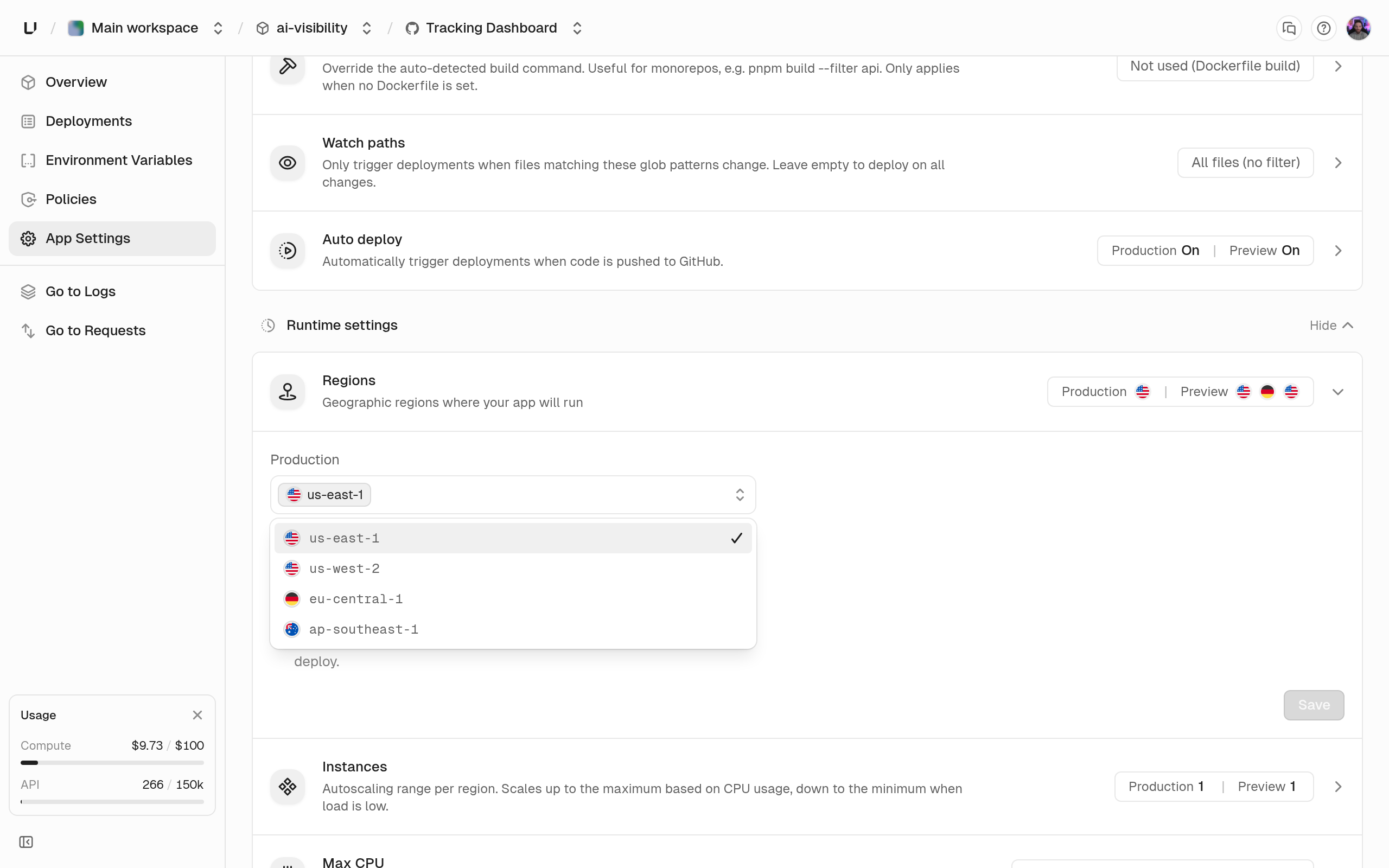 In the dashboard, open the app, go to **Settings**, and use the **Regions** control under runtime settings. Unschedulable regions are visible but not selectable. From the CLI or the API:
```bash CLI theme={"system"}
unkey api environments update-settings \
--project=payments --app=payments-api --environment=production \
--regions='[{"name":"us-east-1","replicas":{"min":1,"max":2}},{"name":"eu-central-1","replicas":{"min":1,"max":2}}]'
```
```bash API theme={"system"}
curl -X POST https://api.unkey.com/v2/environments.updateSettings \
-H "Authorization: Bearer " \
-H "Content-Type: application/json" \
-d '{
"project": "payments",
"app": "payments-api",
"environment": "production",
"regions": [
{"name": "us-east-1", "replicas": {"min": 1, "max": 2}},
{"name": "eu-central-1", "replicas": {"min": 1, "max": 2}}
]
}'
```
The list you send replaces the whole set. A region you leave out is dropped, so send every region you want, not just the new one. The rules the API enforces:
* Between 1 and 5 regions. An empty list is rejected, because an environment cannot have zero regions.
* No duplicates: `Region 'us-east-1' is listed more than once.`
* Every region needs the same `min` and `max`. Mixed bounds fail with `All regions must specify the same replica bounds; per-region autoscaling is not supported yet.`
* `min` is at least 1 and `max` is at most your plan's replicas-per-region ceiling, which is on [Limits](/docs/platform/billing/limits). Outside that you get `Region 'us-east-1' replicas must be between 1 and 4.`
## How failover works
Requests reach whichever Unkey gateway is nearest to the caller. That gateway then decides where to send the request:
1. If its own region has running instances of the deployment, it serves from there. This is the normal path and costs no extra hop.
2. If not, it forwards to the nearest region that does have one, following a fixed proximity order.
3. If none of the regions in that order has an instance, it forwards to any region that does.
4. If no region has one, the request fails with `503` and [`no_running_instances`](/docs/errors/frontline/capacity/no_running_instances).
Only regions your environment is deployed to are candidates. Our gateway picks among the regions that have a running instance of that deployment, so a deployment that runs in one region never serves from another, and traffic never reaches a region you did not choose.
When your environment does span several of them, step 2 resolves in this order:
| Gateway region | Prefers, in order |
| - | - |
| `us-west-2` | `us-east-1`, `ap-southeast-1`, `eu-central-1` |
| `us-east-1` | `us-west-2`, `eu-central-1`, `ap-southeast-1` |
| `eu-central-1` | `us-east-1`, `us-west-2`, `ap-southeast-1` |
| `ap-southeast-1` | `us-west-2`, `us-east-1`, `eu-central-1` |
That ordering matters for data residency. `eu-central-1` is the only European region today, so an environment that must keep traffic in the EU has to run there alone, and it has no regional redundancy. If Frankfurt goes down the deployment returns `503` rather than serving from elsewhere. Adding a second region for availability means accepting that requests can be served outside the EU.
A second region is what protects you from losing a region. Extra replicas in one region protect you from losing an instance, but if that region goes away, so does your app.
Failover is per request and automatic. There is nothing to configure and no order you can set: adding a region to the environment is what makes it a target.
### Rollouts tolerate one bad region
When a deployment starts, Unkey waits for each region to reach the environment's minimum replica count, and releases once all but one region is healthy. A single-region environment waits for that region. A three-region environment goes live once two are up, and the third joins when it recovers. If enough regions are not healthy within 15 minutes, the deployment fails. See [Deployments](/docs/compute/concepts/deployments).
## Choosing regions
Put a region near your users and a region near the data your app talks to. A request served far from your database pays that round trip on every call, which usually outweighs the latency you saved by being close to the user.
Two regions with a couple of replicas each is the minimum we advise for production. Preview environments rarely need more than one region, since they exist to be looked at rather than to survive an outage.
In the dashboard, open the app, go to **Settings**, and use the **Regions** control under runtime settings. Unschedulable regions are visible but not selectable. From the CLI or the API:
```bash CLI theme={"system"}
unkey api environments update-settings \
--project=payments --app=payments-api --environment=production \
--regions='[{"name":"us-east-1","replicas":{"min":1,"max":2}},{"name":"eu-central-1","replicas":{"min":1,"max":2}}]'
```
```bash API theme={"system"}
curl -X POST https://api.unkey.com/v2/environments.updateSettings \
-H "Authorization: Bearer " \
-H "Content-Type: application/json" \
-d '{
"project": "payments",
"app": "payments-api",
"environment": "production",
"regions": [
{"name": "us-east-1", "replicas": {"min": 1, "max": 2}},
{"name": "eu-central-1", "replicas": {"min": 1, "max": 2}}
]
}'
```
The list you send replaces the whole set. A region you leave out is dropped, so send every region you want, not just the new one. The rules the API enforces:
* Between 1 and 5 regions. An empty list is rejected, because an environment cannot have zero regions.
* No duplicates: `Region 'us-east-1' is listed more than once.`
* Every region needs the same `min` and `max`. Mixed bounds fail with `All regions must specify the same replica bounds; per-region autoscaling is not supported yet.`
* `min` is at least 1 and `max` is at most your plan's replicas-per-region ceiling, which is on [Limits](/docs/platform/billing/limits). Outside that you get `Region 'us-east-1' replicas must be between 1 and 4.`
## How failover works
Requests reach whichever Unkey gateway is nearest to the caller. That gateway then decides where to send the request:
1. If its own region has running instances of the deployment, it serves from there. This is the normal path and costs no extra hop.
2. If not, it forwards to the nearest region that does have one, following a fixed proximity order.
3. If none of the regions in that order has an instance, it forwards to any region that does.
4. If no region has one, the request fails with `503` and [`no_running_instances`](/docs/errors/frontline/capacity/no_running_instances).
Only regions your environment is deployed to are candidates. Our gateway picks among the regions that have a running instance of that deployment, so a deployment that runs in one region never serves from another, and traffic never reaches a region you did not choose.
When your environment does span several of them, step 2 resolves in this order:
| Gateway region | Prefers, in order |
| - | - |
| `us-west-2` | `us-east-1`, `ap-southeast-1`, `eu-central-1` |
| `us-east-1` | `us-west-2`, `eu-central-1`, `ap-southeast-1` |
| `eu-central-1` | `us-east-1`, `us-west-2`, `ap-southeast-1` |
| `ap-southeast-1` | `us-west-2`, `us-east-1`, `eu-central-1` |
That ordering matters for data residency. `eu-central-1` is the only European region today, so an environment that must keep traffic in the EU has to run there alone, and it has no regional redundancy. If Frankfurt goes down the deployment returns `503` rather than serving from elsewhere. Adding a second region for availability means accepting that requests can be served outside the EU.
A second region is what protects you from losing a region. Extra replicas in one region protect you from losing an instance, but if that region goes away, so does your app.
Failover is per request and automatic. There is nothing to configure and no order you can set: adding a region to the environment is what makes it a target.
### Rollouts tolerate one bad region
When a deployment starts, Unkey waits for each region to reach the environment's minimum replica count, and releases once all but one region is healthy. A single-region environment waits for that region. A three-region environment goes live once two are up, and the third joins when it recovers. If enough regions are not healthy within 15 minutes, the deployment fails. See [Deployments](/docs/compute/concepts/deployments).
## Choosing regions
Put a region near your users and a region near the data your app talks to. A request served far from your database pays that round trip on every call, which usually outweighs the latency you saved by being close to the user.
Two regions with a couple of replicas each is the minimum we advise for production. Preview environments rarely need more than one region, since they exist to be looked at rather than to survive an outage.