> ## Documentation Index
> Fetch the complete documentation index at: https://unkey.com/docs/llms.txt
> Use this file to discover all available pages before exploring further.
> ## Agent Instructions
> Unkey is two separate products. Compute builds, deploys, and runs apps behind a gateway. API Management issues API keys, enforces rate limits, manages identities and permissions, and reports usage. Say which product a page belongs to; a reader can use either without the other.
> Every Unkey API endpoint is an HTTP POST to https://api.unkey.com/v2/{service}.{procedure} with a root key in the Authorization: Bearer header. Root keys are workspace scoped.
> Error codes have the form err:{system}:{category}:{specific} and each has a page at /errors/{system}/{category}/{specific}.
> The word environment means production or preview in Compute. Rate limiting has four meanings on this site; the glossary lists them.
# Disabling and deleting keys
> Suspend a key for now or delete it so it never works again.
To stop a key from working, disable it or delete it. Disable when it might be temporary, like a failed payment or an investigation. The key keeps its settings and works again when you enable it. Delete when the key should never work again.
You need a root key with the permissions listed on this page. Create one in the dashboard under **Settings > Root Keys**, and pass it as `Authorization: Bearer `. See [Permission reference](/docs/platform/root-keys/permissions-legacy) for every permission.
Disabling and enabling use `keys.updateKey` and need `api.*.update_key` or `api..update_key`. Deleting uses `keys.deleteKey` and needs `api.*.delete_key` or `api..delete_key`. See [Root key permissions](/docs/platform/root-keys/permissions).
## Disable or enable a key
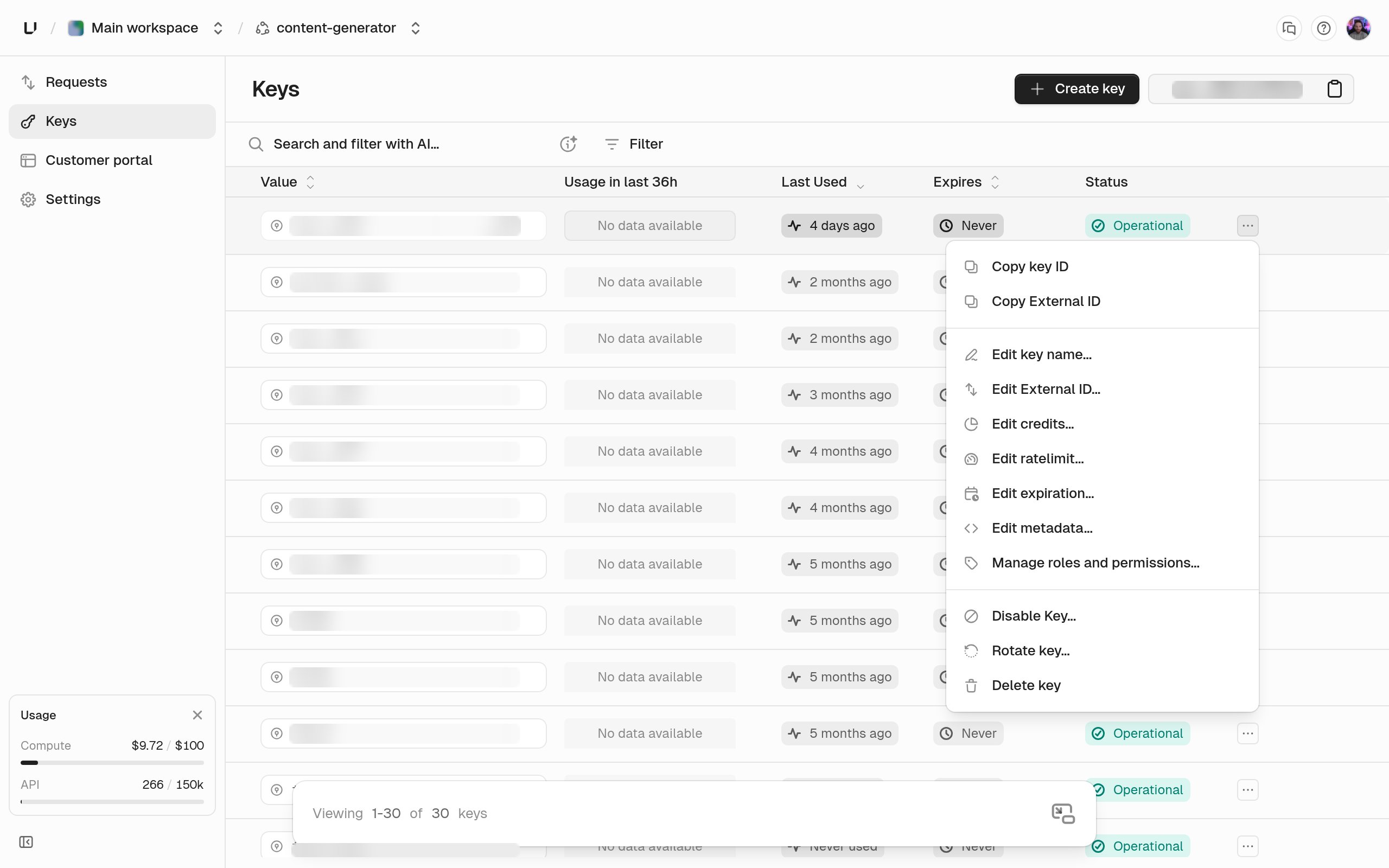 In the dashboard, open the actions menu on the key's row or on its detail page and choose **Disable Key** or **Enable Key**. From the API, set `enabled` on `keys.updateKey`:
`false` suspends the key and `true` restores it. Omitting the field leaves the state unchanged.
```bash theme={"theme":"kanagawa-wave"}
curl -X POST https://api.unkey.com/v2/keys.updateKey \
-H "Authorization: Bearer $UNKEY_ROOT_KEY" \
-H "Content-Type: application/json" \
-d '{ "keyId": "key_...", "enabled": false }'
```
While a key is disabled, every verification returns `valid: false` with `code: DISABLED`, and it doesn't use up rate limits or credits.
```json theme={"theme":"kanagawa-wave"}
{
"meta": { "requestId": "req_..." },
"data": { "valid": false, "code": "DISABLED", "keyId": "key_...", "enabled": false }
}
```
Send `"enabled": true` to restore the key with all its settings as they were. You can also create a key disabled, with `"enabled": false` on `keys.createKey`, for example when access needs approval first.
## Delete a key
In the dashboard, choose **Delete key** from the same actions menu. From the API, call `keys.deleteKey`:
The key to delete.
`false`, the default, deletes the key but keeps a record of it for your audit trail. `true` erases it completely, so the same key string could be issued again later. Use `true` for regulatory erasure requests. The dashboard always uses the default.
```bash theme={"theme":"kanagawa-wave"}
curl -X POST https://api.unkey.com/v2/keys.deleteKey \
-H "Authorization: Bearer $UNKEY_ROOT_KEY" \
-H "Content-Type: application/json" \
-d '{ "keyId": "key_..." }'
```
After deletion, verification returns `code: NOT_FOUND` and the key disappears from listings. The `key.delete` audit log event says whether it was permanent. **Deletion can't be undone.**
## How quickly it takes effect
A disable, enable, or delete takes about 10 seconds to reach verification, and a few verifications just after that can still see the old state. You can't speed it up. If a key must stop working the instant you say so, your own service has to stop accepting it too.
## Revoke everything a user owns
To find the keys linked to an identity, filter `apis.listKeys` by `externalId`, then delete them one by one.
```typescript revoke-user-keys.ts theme={"theme":"kanagawa-wave"}
let cursor: string | undefined;
do {
const { data, pagination } = await unkey.apis.listKeys({
apiId: "api_...",
externalId: "user_123",
cursor,
});
for (const key of data) {
await unkey.keys.deleteKey({ keyId: key.keyId });
}
cursor = pagination.hasMore ? pagination.cursor : undefined;
} while (cursor);
```
## Disable, delete, or reroll
| Situation | Use |
| - | - |
| Billing problem, investigation, pause | Disable, then enable later. |
| User left, key no longer needed | Delete. |
| Key leaked but the user should keep working | [Reroll](/docs/api-management/keys/rerolling-keys): a new key with the same configuration and a grace period for the old one. |
| Erasure request, or you must reuse the exact key string | Delete with `permanent: true`. |
In the dashboard, open the actions menu on the key's row or on its detail page and choose **Disable Key** or **Enable Key**. From the API, set `enabled` on `keys.updateKey`:
`false` suspends the key and `true` restores it. Omitting the field leaves the state unchanged.
```bash theme={"theme":"kanagawa-wave"}
curl -X POST https://api.unkey.com/v2/keys.updateKey \
-H "Authorization: Bearer $UNKEY_ROOT_KEY" \
-H "Content-Type: application/json" \
-d '{ "keyId": "key_...", "enabled": false }'
```
While a key is disabled, every verification returns `valid: false` with `code: DISABLED`, and it doesn't use up rate limits or credits.
```json theme={"theme":"kanagawa-wave"}
{
"meta": { "requestId": "req_..." },
"data": { "valid": false, "code": "DISABLED", "keyId": "key_...", "enabled": false }
}
```
Send `"enabled": true` to restore the key with all its settings as they were. You can also create a key disabled, with `"enabled": false` on `keys.createKey`, for example when access needs approval first.
## Delete a key
In the dashboard, choose **Delete key** from the same actions menu. From the API, call `keys.deleteKey`:
The key to delete.
`false`, the default, deletes the key but keeps a record of it for your audit trail. `true` erases it completely, so the same key string could be issued again later. Use `true` for regulatory erasure requests. The dashboard always uses the default.
```bash theme={"theme":"kanagawa-wave"}
curl -X POST https://api.unkey.com/v2/keys.deleteKey \
-H "Authorization: Bearer $UNKEY_ROOT_KEY" \
-H "Content-Type: application/json" \
-d '{ "keyId": "key_..." }'
```
After deletion, verification returns `code: NOT_FOUND` and the key disappears from listings. The `key.delete` audit log event says whether it was permanent. **Deletion can't be undone.**
## How quickly it takes effect
A disable, enable, or delete takes about 10 seconds to reach verification, and a few verifications just after that can still see the old state. You can't speed it up. If a key must stop working the instant you say so, your own service has to stop accepting it too.
## Revoke everything a user owns
To find the keys linked to an identity, filter `apis.listKeys` by `externalId`, then delete them one by one.
```typescript revoke-user-keys.ts theme={"theme":"kanagawa-wave"}
let cursor: string | undefined;
do {
const { data, pagination } = await unkey.apis.listKeys({
apiId: "api_...",
externalId: "user_123",
cursor,
});
for (const key of data) {
await unkey.keys.deleteKey({ keyId: key.keyId });
}
cursor = pagination.hasMore ? pagination.cursor : undefined;
} while (cursor);
```
## Disable, delete, or reroll
| Situation | Use |
| - | - |
| Billing problem, investigation, pause | Disable, then enable later. |
| User left, key no longer needed | Delete. |
| Key leaked but the user should keep working | [Reroll](/docs/api-management/keys/rerolling-keys): a new key with the same configuration and a grace period for the old one. |
| Erasure request, or you must reuse the exact key string | Delete with `permanent: true`. |