> ## Documentation Index
> Fetch the complete documentation index at: https://unkey.com/docs/llms.txt
> Use this file to discover all available pages before exploring further.
> ## Agent Instructions
> Unkey is two separate products. Compute builds, deploys, and runs apps behind a gateway. API Management issues API keys, enforces rate limits, manages identities and permissions, and reports usage. Say which product a page belongs to; a reader can use either without the other.
> Every Unkey API endpoint is an HTTP POST to https://api.unkey.com/v2/{service}.{procedure} with a root key in the Authorization: Bearer header. Root keys are workspace scoped.
> Error codes have the form err:{system}:{category}:{specific} and each has a page at /errors/{system}/{category}/{specific}.
> The word environment means production or preview in Compute. Rate limiting has four meanings on this site; the glossary lists them.
# Audit logs
> Who changed what in your workspace, and how long the record is kept.
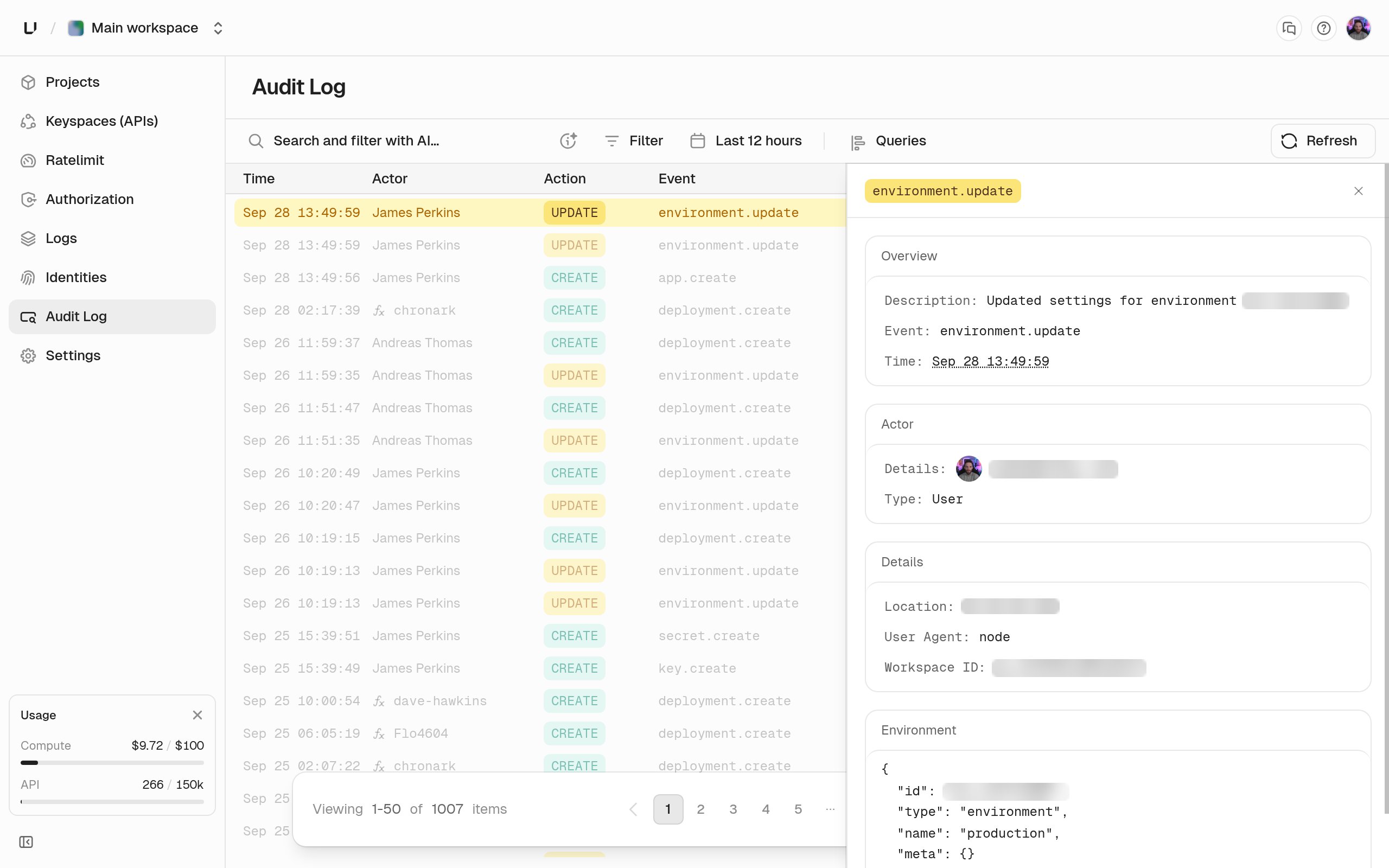
The audit log records every change made through the API or the dashboard: who did it, what they did, what it touched, and from where. Use it to answer "who deleted that key?" or to show a compliance reviewer. Entries are written automatically, and nobody can edit or delete them.
## What an entry contains
Each entry has:
* **An event**, such as `key.create` or `portal.session.exchange`. See [Audit log event types](/docs/api-management/audit-logs/event-types).
* **An actor**, with a type, ID, and name. The type is `user` (someone in the dashboard), `rootkey` (an API call), `portalEndUser` (one of your customers in a [developer portal](/docs/api-management/portal/overview)), `github` (a push or pull request on a connected repository), or `system` (Unkey itself).
* **The resources** it touched, each with a type, ID, name, and optional details such as the fields that changed.
* **The caller's IP address and user agent**, and a readable description.
* **A correlation ID** that groups entries from one action, such as a key creation and the permissions it attached.
Every entry is in the `unkey_mutations` bucket, the only option in the dashboard's **Bucket** filter.
## Which actions are logged
Every create, update, and delete is logged, for keyspaces, keys, identities, roles, permissions, rate limit namespaces and overrides, portals, every Compute resource, and workspace and team changes. Reads aren't logged, with two exceptions: `key.verify` when a **root key** calls `keys.verifyKey`, and `ratelimit.limit` when a root key checks a rate limit. Verifications by the gateway or a portal session aren't in the audit log. They're in [analytics](/docs/api-management/analytics/overview).
## Reading the log
Open **Audit Log** in the dashboard sidebar. Entries are newest first. Expand one to see its resources, description, IP address, and user agent. Filter by **Events**, **Users**, **Root Keys**, **Bucket**, and time range. Press **F** to open the filters and **Q** to reopen saved filters. Every workspace role can read the log, including viewers, but only admins see keys in the **Root Keys** filter.
 ## Retention
Your plan sets how long entries are kept. Check the `Audit log retention` row on **Settings > Limits**. See [Limits](/docs/platform/billing/limits).
| Plan | Audit log retention |
| - | - |
| Free, no Compute plan | 3 days |
| API Pro, any tier | 14 days |
| Compute Starter | 7 days |
| Compute Pro | 14 days |
| Compute Business | 30 days |
| Enterprise | Custom |
No plan keeps audit logs longer than 90 days. To keep them longer, or in your own systems, stream them out with a [log drain](/docs/platform/workspace/log-drains).
## Retention
Your plan sets how long entries are kept. Check the `Audit log retention` row on **Settings > Limits**. See [Limits](/docs/platform/billing/limits).
| Plan | Audit log retention |
| - | - |
| Free, no Compute plan | 3 days |
| API Pro, any tier | 14 days |
| Compute Starter | 7 days |
| Compute Pro | 14 days |
| Compute Business | 30 days |
| Enterprise | Custom |
No plan keeps audit logs longer than 90 days. To keep them longer, or in your own systems, stream them out with a [log drain](/docs/platform/workspace/log-drains).